
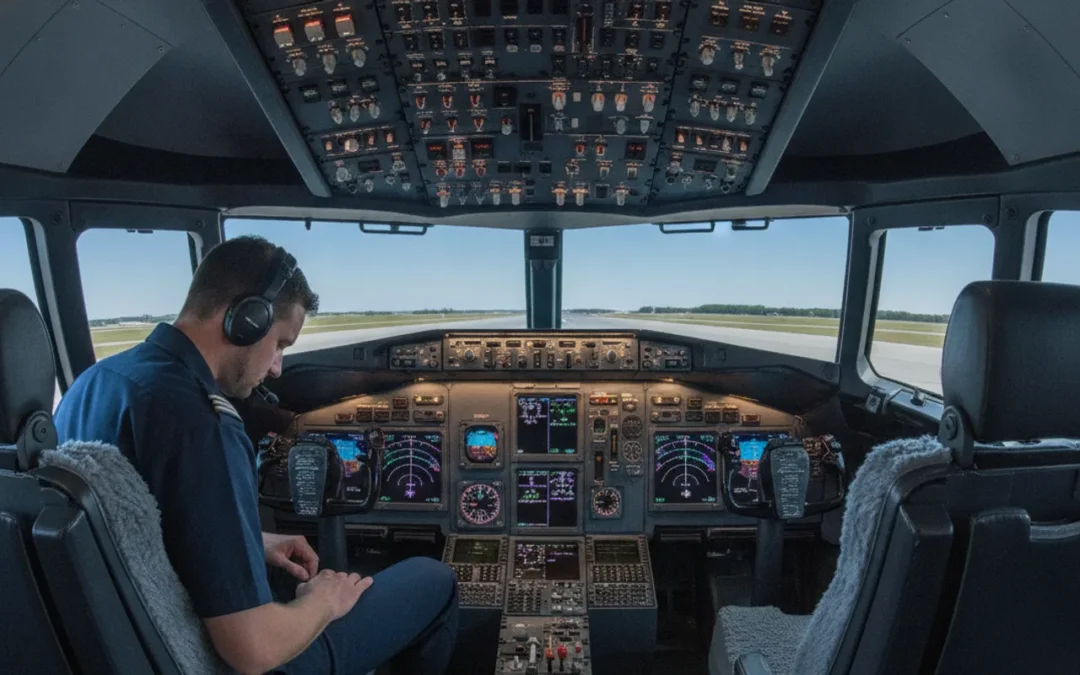
Before a simulator session, 737 NG cockpit familiarization should help a pilot recognize the flight deck, find the information they need, and arrive ready to learn from the instructor. It is not a shortcut to a type rating or a substitute for approved course materials. A useful goal is simple: build a mental map of the cockpit, identify what you still need to ask, and avoid memorizing actions outside the procedures and configuration that apply to your training.
Ask about 737 training options
What does 737 NG cockpit familiarization need to accomplish?
Familiarization is an orientation task. It gives you a structured first look at the flight deck so that later study and instruction have a place to attach. It does not mean you are expected to operate the aircraft from memory before training begins.
For a pilot preparing for simulator sessions, useful outcomes include being able to:
- Describe the broad cockpit zones and locate major groups of controls and displays.
- Recognize the names and purposes of the systems and controls in your assigned study material.
- Distinguish what you already understand from what needs instructor explanation.
- Follow the course’s approved procedures and use the correct reference material for the aircraft and training event.
The purpose is not to arrive with every switch action memorized. Aircraft configuration, operator procedures, training objectives, and instructor direction matter. Your pre-session study should therefore improve orientation and questions, not create a personal procedure that competes with approved instruction.
How can you build a mental map of the cockpit?
Start with the layout before diving into system details. Use the official material provided for your course, such as an approved cockpit diagram, training guide, or other assigned reference. If you are reviewing general resources, confirm that they apply to the 737 NG and the specific configuration you will train in. Similar-looking panels are not proof that details are interchangeable.
Organize your review into broad areas. The forward instrument panel is where you will study primary flight and navigation displays. The glareshield area includes controls and indications that warrant close attention in your course material. The center pedestal and overhead contain additional controls and system groupings. These are orientation labels, not a sequence of actions or a checklist for operating the aircraft.
Use a repeatable scan when looking at a diagram or a simulator cockpit. First, identify the overall area. Next, note the labels and groupings shown in your approved reference. Then explain, in plain language, what each item is for at the level your course expects. Finally, mark anything uncertain for the instructor rather than filling gaps with a guess.
Visual scanning is also a skill worth approaching deliberately. Research on cockpit visual scanning describes how scan strategies vary with experience and task demands; it is not a recipe for one universal scan. Treat it as a reminder to study how information is organized and to follow your training program’s guidance, not as authority for a specific 737 procedure. Read the research on visual scanning strategies in the cockpit.
How can you turn a cockpit diagram into a useful study exercise?
Keep the exercise small enough to repeat. Choose one cockpit area shown in your assigned diagram, cover its labels if your reference allows it, and try to name the broad groups you can identify. Then uncover the reference and check each item. The point is not to test whether you can recall every label. It is to see whether the layout is becoming familiar and to notice which terms need review.
Make a two-column note: “I can locate and describe” and “I need to verify.” Put a label in the first column only if you can both find it and explain what your course material says about it. In the second, write the page, figure, or exact question that prompted uncertainty. For example, note that two labels look similar in a diagram and ask which distinction matters for the coming session. This turns vague nerves into a short, answerable instructor question.
Which cockpit areas should you review before simulator training?
Review the areas named by your course materials rather than relying on a generic internet checklist. A useful orientation pass can still be organized around a few questions:
- What is this area called? Learn the terminology used in your assigned materials.
- What information or function does it relate to? Describe its role at a conceptual level, without inferring a procedure.
- What else is nearby? Notice layout and grouping so you can find the relevant reference faster.
- What do I need to verify? Record discrepancies, unfamiliar labels, and configuration questions for your instructor.
Do not turn the orientation pass into a hunt for every control in every possible configuration. Focus on what the course says you will use. If the aircraft or simulator setup differs from a diagram you have seen, pause and ask which material applies. A 737 systems overview can help you recognize the broad subject areas, but assigned course sources should govern your preparation.
It can also help to review how simulator preparation fits into professional training as a whole. Las Vegas Flight Academy provides Boeing 737 type rating training information; prospective trainees can use the program page to understand the training context and ask what material is appropriate before a course begins.
How should you study switchology without memorizing the wrong thing?
Switchology is the study of cockpit controls: where they are, what they are called, and how their functions are taught. For initial preparation, prioritize recognition and understanding over rote movement. A switch’s label or location may be easy to memorize while the conditions, sequence, or callouts for its use depend on an approved procedure.
Use this three-part method with course-approved material:
- Locate: Find the control or indication on the correct diagram or training device. Say its name using the terminology in the reference.
- Explain: Summarize its general purpose in a sentence. Keep the explanation at the level the source supports.
- Verify: Note any action, setting, limitation, or sequence that your materials do not clearly establish. Ask the instructor instead of assuming.
For example, a learner can practice identifying a labeled control and finding its description in the assigned reference without rehearsing an aircraft action sequence independently. If your course assigns a procedure, study it from that source and follow the instructor’s method. Do not transfer a switch position, sequence, or callout from another aircraft model, simulator, operator, or online video unless your training materials confirm it applies.
This boundary matters with automation, too. NASA’s study of learning cockpit automation across aircraft types offers context for why automation familiarization is a training subject rather than something to infer from panel appearance alone. The study does not replace aircraft-specific guidance. Review NASA’s work on learning about cockpit automation, then use your course materials for the procedures and standards that apply to your session.
What should you learn about displays and information flow?
Instead of trying to memorize every display detail in one sitting, ask how your training materials organize information. Identify display names and their general purpose, then learn where the course directs you to look for additional detail. This is a study skill, not guidance to use a display in flight.
Try a simple review loop. Read a short section, close the material, and explain the concept without adding details that were not in the source. Reopen the reference to check your explanation. Write down the exact point you could not explain, then bring that question to class. This approach exposes gaps without encouraging you to fill them with unsupported recollection.
For instance, if a reference introduces a display and later explains associated indications elsewhere, note both places instead of relying on memory of a diagram. Ask yourself what the course expects you to recognize at this stage and what it expects you to learn with instructor guidance. When an illustration is unclear, record its figure number or caption so that you can discuss the same item together. That small bit of context makes a question easier to answer and prevents a general web search from becoming a substitute for the assigned source.
If you are comparing resources, separate background reading from controlling references. A general guide to flying a Boeing 737 may offer context, while your assigned course documents establish what you must study. Similarly, the academy’s overview of Part 142 training can explain the training-center framework, but it does not answer aircraft-specific procedural questions.
How can you keep self-study inside safe boundaries?
Use a clear rule: orient yourself with general study, but rely on the approved syllabus, instructor, and applicable aircraft documentation for operational detail. If two sources disagree, do not choose the one that seems more familiar. Flag the conflict and ask which source governs your course.
Keep these boundaries in mind:
- Do not treat a cockpit photo, video, or unofficial diagram as an operational checklist.
- Do not assume procedures are identical across aircraft variants, configurations, operators, or training events.
- Do not practice an emergency or abnormal procedure from memory based on a short online summary.
- Do not infer a control’s required position from a static image.
- Do not let study time replace rest, course requirements, or instructor-led briefing and debriefing.
These limits do not make preparation less useful. They keep preparation focused on the things a pilot can responsibly do alone: learn vocabulary, orient to a layout, review assigned concepts, and prepare precise questions. The academy’s ATP-CTP training guide describes a different professional training program; it can help readers distinguish training pathways, but it should not be mistaken for 737-specific course instruction.
What is a practical pre-session familiarization checklist?
Use this checklist to organize preparation. Follow any course-specific instructions that differ, and leave operational questions for the instructor.
| Preparation area | What to do before the session | What to bring to the instructor |
|---|---|---|
| Course scope | Read the assigned material and note the aircraft and training event it covers. | Questions about which reference or configuration applies. |
| Cockpit layout | Use an approved diagram to identify broad cockpit zones and terminology. | Labels or locations you cannot identify confidently. |
| Controls and switchology | Locate assigned controls and summarize their general purpose from the source. | Any uncertainty about operation, settings, sequence, or callouts. |
| Displays and systems | Review only the concepts assigned for the session; check your understanding against the text. | Unclear relationships or conflicting descriptions in study resources. |
| Study plan | Make a short list of topics to revisit and stop when the material is no longer clear. | Requests for a recommended preparation order or additional approved references. |
A manageable preparation session can follow three passes. First, preview the assigned material and mark the cockpit areas it covers. Second, review one area at a time using the locate, explain, and verify method. Third, close your notes and write down what still needs clarification. You might finish with only a few questions, such as which diagram matches the simulator or which terms to recognize before the first session. That is more useful than a long list of memorized actions without a clear source.
Before the session, do one final check: Can you find each assigned cockpit area in the approved material? Can you explain the purpose of the topics you reviewed without inventing details? Do you have your questions written down? If so, you have prepared for an effective learning conversation without pretending that self-study replaces supervised training.
What questions should you ask your instructor?
Good questions are specific and tied to the materials in front of you. Rather than asking, “What should I memorize?” point to the topic or diagram and explain where your understanding stops. That gives the instructor a clear starting point and helps keep the answer relevant to your session.
- Which cockpit diagram or reference should I use for this simulator and training event?
- Which controls or display areas should I recognize before the first session?
- How should I distinguish conceptual background study from procedures I must learn in the course?
- What should I do when a general resource differs from the assigned material?
- Are there configuration-specific details I should avoid assuming?
You can make these questions even more useful by attaching a source and a point of uncertainty. For example, say which figure you reviewed, what you think it shows, and what you cannot confirm. Ask whether the difference matters to the upcoming lesson or belongs to a later topic. This keeps the discussion bounded and gives your instructor room to direct you to the right material instead of asking you to reconcile several unrelated online explanations.
For program-specific questions, review the academy’s ATP-CTP course information or its training-center background, then contact the academy for guidance on the right next step. Course fit and preparation details should be confirmed directly, not inferred from a general article.
Contact Las Vegas Flight Academy about your training questions
What should pilots know about 737 NG cockpit familiarization?
Does 737 NG cockpit familiarization mean memorizing every switch?
No. Start by learning the cockpit layout, terminology, and general purpose of assigned controls. Learn procedures and required actions only from the approved material and instruction for your course.
Can online videos replace 737 NG cockpit familiarization materials?
No. Videos may provide background, but they may show a different configuration or teach a different operator’s practices. Use the references assigned by your training provider and ask about any discrepancy.
How early should I begin 737 NG cockpit familiarization?
Follow the preparation timeline your provider gives you. If no timeline is available, ask what to review and when; avoid assuming that a fixed number of days applies to every course or pilot.
What is the best first step in 737 NG cockpit familiarization?
Read the assigned material and identify the cockpit areas and concepts it covers. Make a short list of unclear terms and questions, then bring that list to your instructor.
Effective familiarization is measured by how well you can orient yourself, use the right references, and ask useful questions, not by how much you can recite without context. Let your approved training materials and instructor guide the transition from cockpit awareness to aircraft-specific proficiency.